I Wanted git push to Be Enough
I wanted deploying a new project to be boring.
Write the code, push it, and let the infrastructure handle everything else.
I did not want every new project to start with the same checklist: SSH into a server, clone a repository, install dependencies, copy environment variables, configure a process, create a reverse proxy entry, request a certificate, add monitoring, and hope I remembered everything.
The interface I wanted was much simpler:
git pushEverything after that should be infrastructure.
What started as a Proxmox server for experimenting with Linux and self-hosting gradually became the backend behind most of my projects: Git hosting, CI/CD, deployments, DNS-related services, monitoring, alerts, storage, internal tools, and a growing number of applications.
It was not designed all at once.
It grew one problem at a time.
This is an overview of how the system works today, why I ended up building it this way, what broke along the way, and what I would change if I had to start again.
Before git push Was Enough
Deploying something manually is not difficult.
The problem is doing it again.
And again.
And again.
A typical small project initially looked something like this:
write code
    ↓
push repository
    ↓
SSH into server
    ↓
pull changes
    ↓
install dependencies
    ↓
build application
    ↓
restart process
    ↓
check reverse proxy
    ↓
check TLS
    ↓
open the website
    ↓
hope nothing broke
For one project, that is manageable.
For several websites, APIs, internal services, demos, and experiments, it becomes repetitive very quickly.
Worse, every manually deployed project slowly becomes slightly different.
One application uses a systemd service.
Another runs in Docker.
One has its environment variables stored in a file.
Another has them configured somewhere else.
One deployment has a health check.
Another one just gets restarted and is assumed to work.
That kind of inconsistency is fine until something breaks six months later and I have to remember how a particular service was originally deployed.
I wanted deployments to become repeatable rather than memorable.
What I Actually Wanted
Before choosing tools, the requirements were fairly simple.
I wanted my repositories under my control.
I wanted commits to be checked before deployment.
I wanted applications to be isolated from each other.
I wanted HTTPS and domains to be routine rather than a separate task.
I wanted to know when something stopped working.
And most importantly, I wanted deploying a normal project to require as little manual server work as possible.
The ideal flow looked like this:
git push
   ↓
source control
   ↓
build & checks
   ↓
deployment
   ↓
application
   ↓
HTTPS
   ↓
monitoring
The interesting part is that none of those individual problems are particularly difficult.
The challenge is making them work together without turning the entire system into something that requires more maintenance than the applications themselves.
I had no reason to build my own Git server implementation, container runtime, reverse proxy, monitoring database, or deployment orchestrator.
The goal was not to reinvent the stack.
The goal was to connect existing tools into something that behaved like one system.
The Infrastructure Underneath It
The foundation of the setup is Proxmox VE.
I originally started using Proxmox because I wanted an easy way to experiment with different services without turning the host operating system itself into an unmaintainable collection of packages and configuration files.
That decision ended up shaping almost everything else.
Instead of thinking of the physical server as the place where applications run, I treat it as the layer that runs other environments.
Physical server
       │
       ▼
  Proxmox VE
       │
 ┌─────┼───────────────┐
 │     │               │
 ▼     ▼               ▼
LXC    VM              VM
 │     │               │
 │     │               └── monitoring
 │     │
 │     └── Docker / services
 │
 └── lightweight infrastructure
Different workloads get different levels of isolation.
I use virtual machines where having a completely separate operating system makes sense.
LXC containers are useful for lightweight infrastructure services where dedicating an entire VM would be unnecessary.
Docker handles application-level isolation where I want services to be disposable and reproducible.
Those layers are not interchangeable.
A VM isolates a system.
A container packages an application.
LXC sits somewhere between the two and is extremely convenient for small services that should behave like independent machines without requiring the resources of full virtual machines.
The result is slightly more complicated than installing everything directly on Debian or Ubuntu, but failures are much easier to contain.
Breaking one service should not mean breaking the server.
The Homelab Is Not the Entire Internet
One thing I learned fairly early is that self-hosting does not mean everything has to run from my house.
Some services make sense inside the homelab.
Others make more sense on a public VPS.
My setup gradually became a hybrid of the two.
The Proxmox environment runs much of the supporting infrastructure: development services, monitoring, internal applications, storage-related services, and things I want full control over.
Public-facing workloads can live on infrastructure better suited to being permanently exposed to the Internet.
That distinction matters.
I like self-hosting, but I do not want a temporary problem with my home connection to take every public project offline.
So instead of treating the homelab as one giant production server, I treat it as part of a larger system.
Conceptually, it looks more like this:
                    Internet
                       │
                       ▼
                DNS / Cloudflare
                       │
             ┌─────────┴─────────┐
             │                   │
             ▼                   ▼
      Public application      Homelab
          server                │
             │                  │
             ▼                  ├── Git
          Coolify               ├── CI
             │                  ├── monitoring
             ▼                  ├── internal tools
          Docker                └── services
             │
             ▼
       applications
The line between "cloud" and "self-hosted" is therefore not particularly important to me.
Control is more useful than ideology.
Git Starts the Process
My repositories live in Gitea.
GitHub is excellent, and I still use external platforms where they make sense, but I wanted the infrastructure behind my own projects to be capable of operating independently.
Gitea gives me a very small and predictable Git service without requiring much attention.
More importantly, it gives the rest of the infrastructure a clear starting point.
Every deployment begins with a commit.
git add .
git commit -m "..."
git push
From that point onward, I want automation to take over.
That separation is useful because my laptop should not contain some magical deployment state.
If deployment requires a particular directory on my computer, an SSH alias I configured eight months ago, and a shell command I only vaguely remember, the process is not really automated.
The repository should contain enough information for the infrastructure to understand how the project is supposed to behave.
What Actually Happens After git push?
This is the part of the setup I care about most.
A push reaches Gitea.
From there, CI can start validating the commit.
I currently use Woodpecker CI for that part of the pipeline.
The exact checks depend on the project, but the general idea is always similar:
Developer
    │
    │ git push
    ▼
  Gitea
    │
    ▼
Woodpecker CI
    │
    ├── install
    ├── lint
    ├── typecheck
    ├── test
    └── build
    │
    ▼
 deployment
    │
    ▼
 Coolify
    │
    ▼
  Docker
    │
    ▼
application
Not every project needs every step.
A static site does not need the same pipeline as an API.
A small internal tool might not have a full test suite.
The important part is not forcing every application into exactly the same pipeline.
The important part is that failures happen before a broken build silently becomes the production version.
A failed typecheck is cheaper than a failed deployment.
A failed build is cheaper than a broken website.
CI is essentially where I try to make mistakes boring as well.
Why I Use Coolify
At some point I had to decide whether I wanted to build the deployment layer myself.
I did not.
There is a difference between building infrastructure to learn how systems work and rebuilding an existing tool because I can.
For my public application server, Coolify handles a lot of the repetitive deployment work I do not particularly want to own.
It manages the lifecycle around applications:
builds,
Docker workloads,
environment variables,
domains,
TLS,
deployments,
application restarts,
and the surrounding reverse-proxy configuration.
That means I can keep the interesting logic inside the repository instead of creating a collection of hand-written deployment scripts for every application.
This is also one of the more important lessons from the entire project:
self-hosting does not mean building everything yourself.
The infrastructure is valuable because of what it lets me build on top of it.
If an existing open-source project solves a layer well, using it is usually a better engineering decision than turning that layer into another unfinished side project.
A Real Workload: forms.emkacz.pl
Architecture diagrams are easy to make look clean.
A better test is whether the infrastructure actually makes building new applications easier.
One example is the centralized forms service I use for websites.
I was building several websites that all needed essentially the same thing: a contact form.
The obvious solution would have been to add a tiny form backend to every project.
That would also mean duplicating validation, spam protection, email delivery, logging, administration, and deployment every time.
Instead, I built one service.
At a high level:
Website
   │
   │ POST
   ▼
Forms API
   │
   ├── input validation
   ├── origin checks
   ├── rate limiting
   ├── honeypot
   └── Turnstile
   │
   ▼
submission storage
   │
   ├───────────────┐
   │               │
   ▼               ▼
email delivery   admin panel
The backend is built with Fastify.
Input is validated before processing.
Submissions are persisted even when email delivery fails, because losing a contact request just because an SMTP server had a bad day would be a terrible design.
The administrative interface gives me one place to inspect submissions from different websites.
Each website can have its own configuration and recipients without requiring its own independent backend.
The application itself is not particularly large.
That is exactly why it is a useful example.
Infrastructure should make small applications easier to ship, not just make large systems possible.
When I want to update the forms service, the deployment process is the same interface I wanted from the beginning:
git pushShipping Is Only Half the Problem
Getting software into production turned out to be the easier half.
The other half is knowing whether it is still working tomorrow.
Once enough services were running, checking them manually stopped being realistic.
Opening ten dashboards every morning is not monitoring.
So I started building a proper observability layer.
Prometheus collects metrics.
Grafana gives me a useful way to inspect them.
Alerts can eventually make their way to ntfy, which means the infrastructure can tell me when something needs attention instead of waiting for me to discover it accidentally.
services
   │
   │ metrics
   ▼
Prometheus
   │
   ▼
Grafana


failure / alert
   │
   ▼
 ntfy
   │
   ▼
phone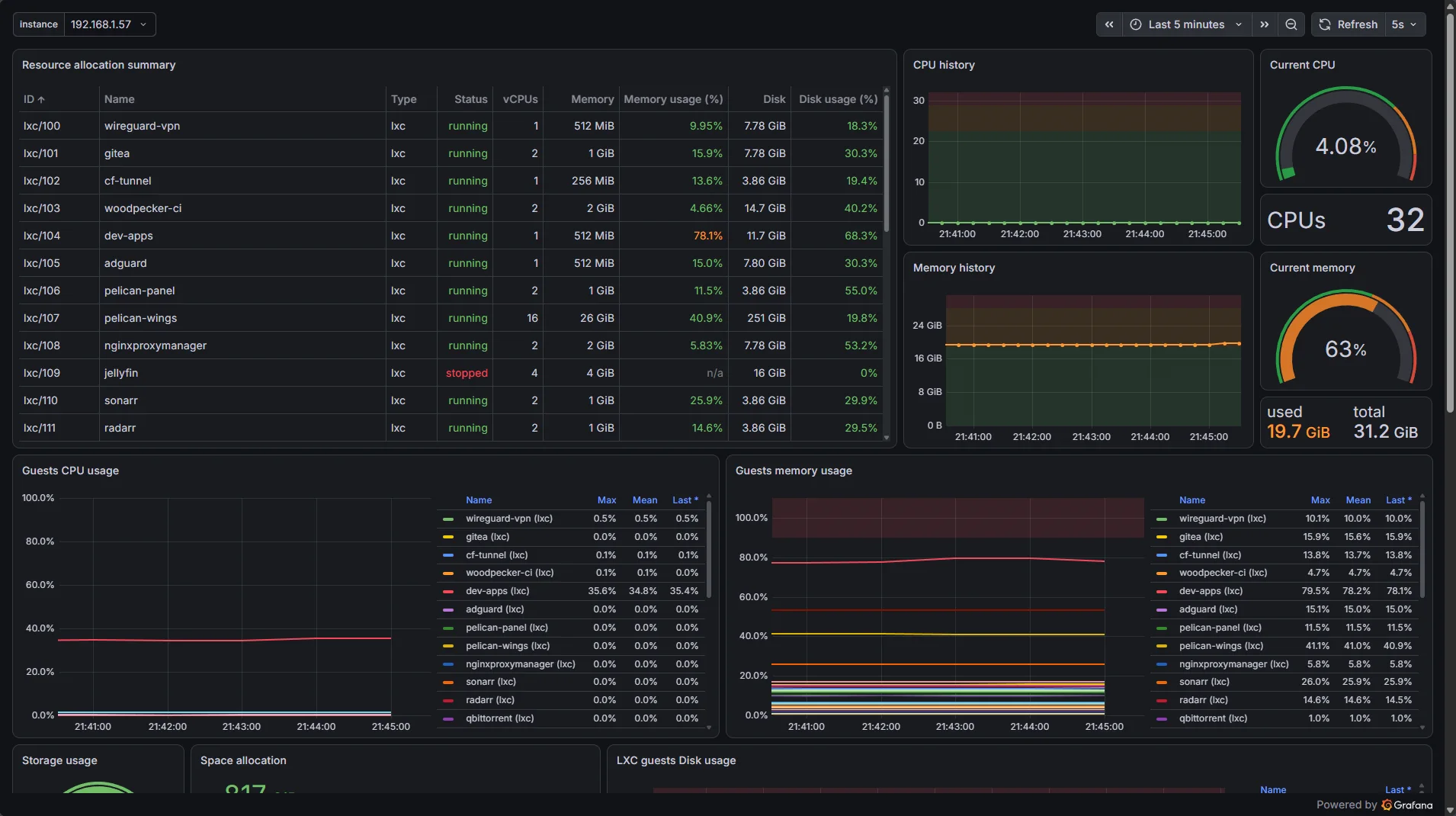
This is one of the places where the system stopped feeling like a collection of self-hosted applications and started feeling like infrastructure.
There is a significant difference between:
I have a server.
and:
I know what my server is doing.
CPU and memory usage are the obvious metrics, but the useful questions are usually higher-level.
Is the application reachable?
Did deployments begin failing?
Is a disk filling up?
Is a service restarting repeatedly?
Has resource usage changed significantly?
Observability does not prevent failures.
It reduces the amount of time failures can remain invisible.
The Architecture Diagram Makes It Look More Intentional Than It Was
A finished architecture diagram is dangerous.
It makes a system look as if somebody designed the entire thing on a whiteboard, implemented it exactly once, and never made a mistake.
That is not how this happened.
Most of the architecture exists because something broke first.
I have dealt with conflicting IP assignments, services becoming unreachable, deployment hooks not behaving the way I expected, DNS problems, reverse-proxy problems, containers that worked perfectly until they did not, and configuration that made complete sense when I wrote it but considerably less sense several months later.
The interesting part of running this environment has never been installing software.
Installation usually takes minutes.
Understanding failure can take hours.
Networking Problems Are Rarely "Just Networking"
A good example is an IP conflict.
On paper, finding one is simple.
Two devices are using the same address.
Fix the address.
Done.
In reality, the symptom might simply be that one service works intermittently.
You start checking the application.
Then the container.
Then the host.
Then DNS.
Then the reverse proxy.
Eventually an ARP table shows something that should not be there.
The important lesson was not simply "do not create duplicate DHCP reservations."
It was that debugging becomes much faster when the infrastructure has clear boundaries.
If I know which layer owns an address, which layer owns DNS, which layer terminates HTTP, and which layer runs the application, I can eliminate entire categories of possible causes.
Without those boundaries, every outage becomes "the server is broken."
That is not a useful diagnosis.
Automation Can Fail Too
Automation removes repetitive work.
It also creates new failure modes.
A manual deployment can fail because I typed the wrong command.
An automated deployment can fail because the webhook never fired, a credential expired, a build changed, a dependency disappeared, a health check behaved differently than expected, or the deployment system simply lost communication with another component.
That does not make automation worse.
It changes where the debugging happens.
The difference is that once I fix an automated process correctly, I fix it for every future deployment.
That is the compounding benefit.
Every manual process asks me to be careful again.
Every automated process gives me an opportunity to make the careful decision once.
The Boring Parts Matter More Than the Dashboard
Self-hosting content often focuses on the visible parts.
Nice dashboards.
Service lists.
Rack photos.
Graphs.
The parts that actually determine whether the environment remains usable six months later are much less exciting.
Backups.
DNS.
TLS.
Secrets.
Updates.
Authentication.
Storage.
Recovery.
Documentation.
Those are also the parts that are easiest to postpone because nothing immediately breaks when they are missing.
I have learned to be suspicious of infrastructure that looks finished.
If I cannot answer how a service is backed up, how it gets restored, how its credentials are rotated, or what happens when its machine disappears, then the deployment is not really finished.
It is merely running.
Self-Hosting Does Not Automatically Mean Secure
Running something yourself does not automatically make it more private, more resilient, or more secure.
It mostly transfers responsibility.
If I expose an administrative panel directly to the Internet with weak authentication, there is no cloud provider to blame for that decision.
If backups are stored on the same machine as the data they protect, calling them backups does not make them useful.
If I publish every internal hostname, IP address, network diagram, firewall rule and management endpoint on a public blog, I am making somebody else's reconnaissance easier.
That is why the public version of my infrastructure diagrams is intentionally incomplete.
The interesting architectural decisions can be explained without publishing an instruction manual for reaching every management interface.
Security through obscurity is not security.
But unnecessary disclosure is still unnecessary.
Things I Deliberately Do Not Self-Host
This might sound strange in a post mostly about self-hosting, but I do not think the correct end state is running every possible service myself.
Self-hosting has a cost.
Every service consumes some combination of:
compute,
storage,
maintenance time,
backup space,
attention,
and future debugging.
The last one is usually the most expensive.
There are services where self-hosting gives me something valuable: control, integration, learning, lower cost, flexibility, or independence.
There are others where I would simply be replacing a mature service with another thing I have to maintain.
I try to make that decision based on the problem rather than the ideology.
If something external works better and does not create an unacceptable dependency, I am perfectly happy to use it.
The goal is not maximum self-hosting.
The goal is useful infrastructure.
What I Would Do Differently
If I were rebuilding the environment today, I would not start by deploying as many services as possible.
That is probably the most obvious mistake people make when they first discover self-hosting.
A new service is fun.
Maintenance is not.
I would start with the foundations earlier.
Monitoring would exist sooner.
Backups would be part of the initial design rather than something added after a service became important.
Naming conventions would be decided before there were enough machines for inconsistent names to become annoying.
I would document dependencies more aggressively.
I would also ask one question much more often:
Does this actually need to be a separate service?
It is easy to turn a homelab into a collection of software that exists mainly to manage the other software.
There is a point where infrastructure stops reducing complexity and starts producing it.
Finding that point is much harder than installing another container.
What I Like About the Setup Now
Despite the unnecessary complexity I introduced along the way, I like where the system ended up.
Not because it contains a lot of services.
The useful part is that I can build something new without first having to invent where it will live.
A repository already has somewhere to go.
CI already exists.
Deployment already exists.
Domains and TLS are normal operations.
Monitoring already exists.
Alerts have somewhere to go.
The infrastructure becomes a platform rather than a project requirement.
That changes the way I approach small ideas.
A project does not need to justify several hours of deployment work before I can put it online.
I can build something, push it, and see whether it is useful.
That is the part I wanted from the beginning.
Where It Goes From Here
This post intentionally stays at the architecture level.
Almost every box in the diagrams has enough decisions, mistakes, configuration, and debugging behind it for its own article.
There are several parts I want to document separately:
the Gitea and CI workflow,
how I structure deployments,
monitoring with Prometheus and Grafana,
the networking between services,
backups and recovery,
the architecture behind
forms.emkacz.pl,and some of the failures that taught me more than the successful deployments did.
I also expect the architecture shown here to become outdated.
Services will move.
Some will disappear.
Others will be replaced.
Parts of the setup that currently feel essential will probably look unnecessary a year from now.
That is fine.
The infrastructure will probably change before I finish writing about it.
That is part of the point.